Browser extension for recruiters & staffing agencies

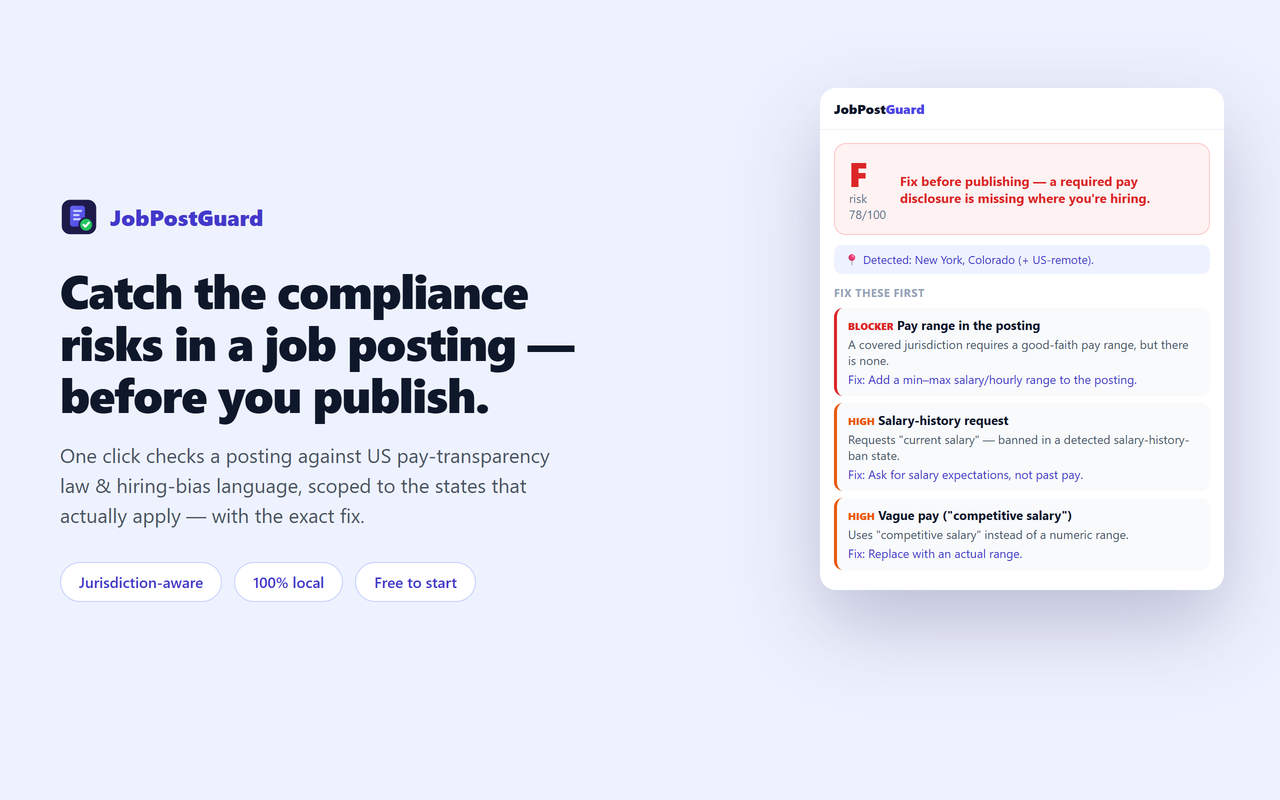
Catch the pay-transparency & bias risks in your job posting — before you publish.

One click checks the job posting you're viewing — on LinkedIn, Indeed, Greenhouse, Workday or your careers page — against US pay-transparency law in 15+ states and age/gender/ableist bias language, jurisdiction-aware and each mapped to the rule with the fix. Read-only. 100% local.

Get JobPostGuard — Free See pricing Jurisdiction-aware · Read-only · Not legal advice
JobPostGuard panel showing a job-posting compliance grade, a 'fix before publishing' banner, and the top fixes

Fix what gets postings challenged — before you hit publish

JobPostGuard audits a posting the way a compliance reviewer would, and hands you a ranked to-do list.

💵

Pay-transparency check

Detects a missing or vague ("competitive salary", "DOE") pay range and open-ended/bad-faith ranges — required in 15+ US states/localities, and it only fails where a covered jurisdiction applies.

📍

Jurisdiction-aware

Reads the location + remote status and scopes each finding to the laws that actually apply — a real violation where covered, an advisory everywhere else. No false alarms.

⚖️

Bias & EEO language

Flags age proxies ("recent grad", "digital native"), gender-coded wording, ableist phrasing, and a missing EEO statement — mapped to EEOC / ADEA / Title VII / ADA guidance.

🔗

Every flag maps to the rule

Not just a score. Each issue links to the source law or guidance and a concrete fix, ranked so you fix the blockers first.

📄

White-label PDF report

Staffing & recruiting agencies hand clients a branded compliance report per posting. (Pro)

🔒

Read-only & private

It never changes the posting and nothing is uploaded — the audit runs entirely in your browser.

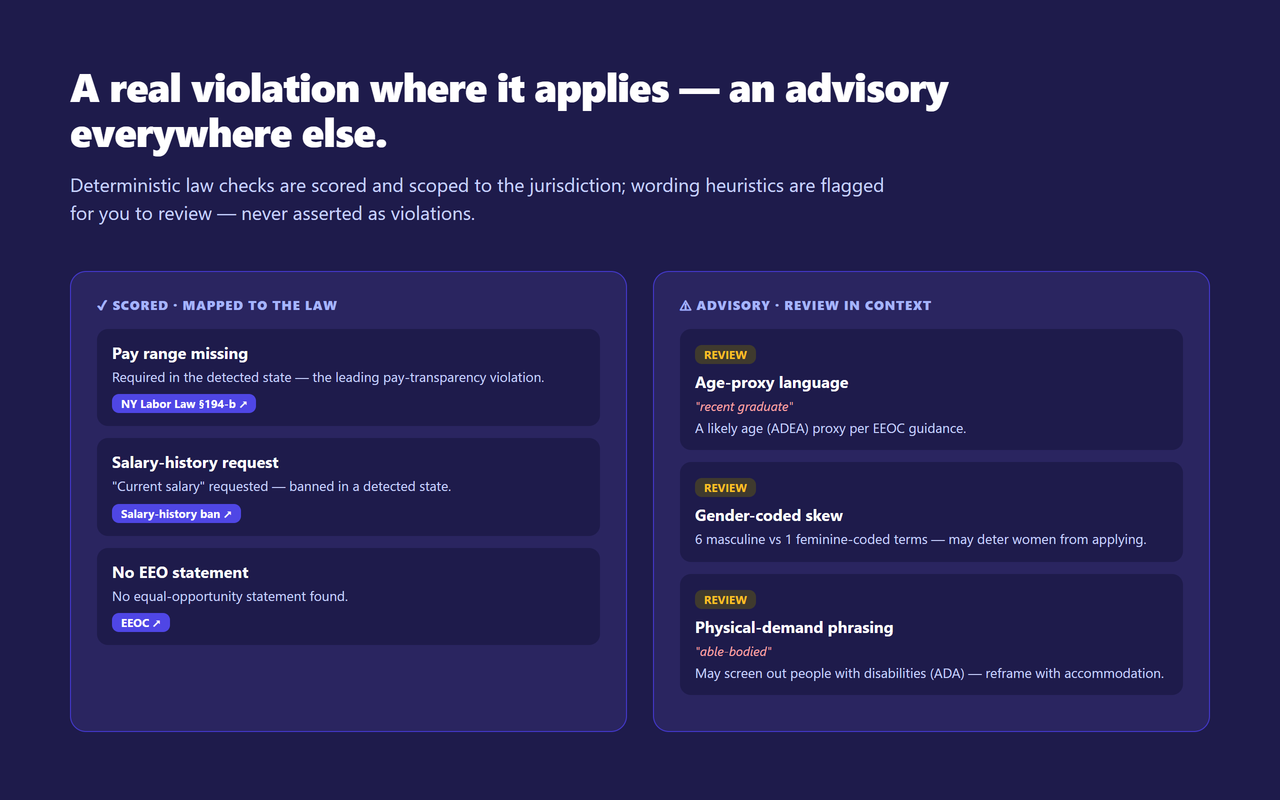
A real violation where it applies — an advisory everywhere else

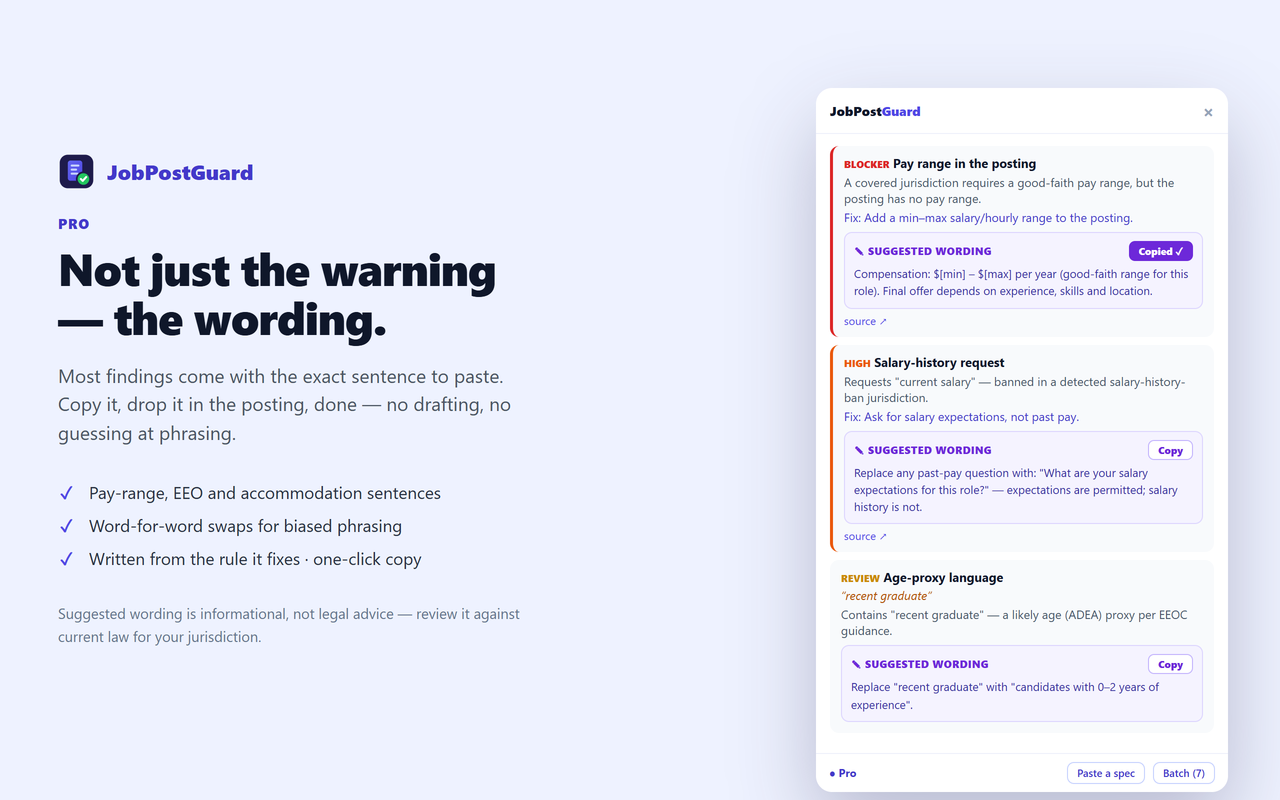
Deterministic law checks are scored and jurisdiction-scoped; wording heuristics are flagged for you to review.

JobPostGuard showing scored pay-transparency findings that map to the state law, alongside advisory bias-language flags with the matched wording

Three steps

1

Open a job posting

On LinkedIn, Indeed, Greenhouse, Workday, or your careers page — or your ATS draft preview.

2

Click the icon

JobPostGuard reads the posting locally and grades it against the applicable laws.

3

Fix & re-check

Work the ranked fix-list, then re-run before you publish.

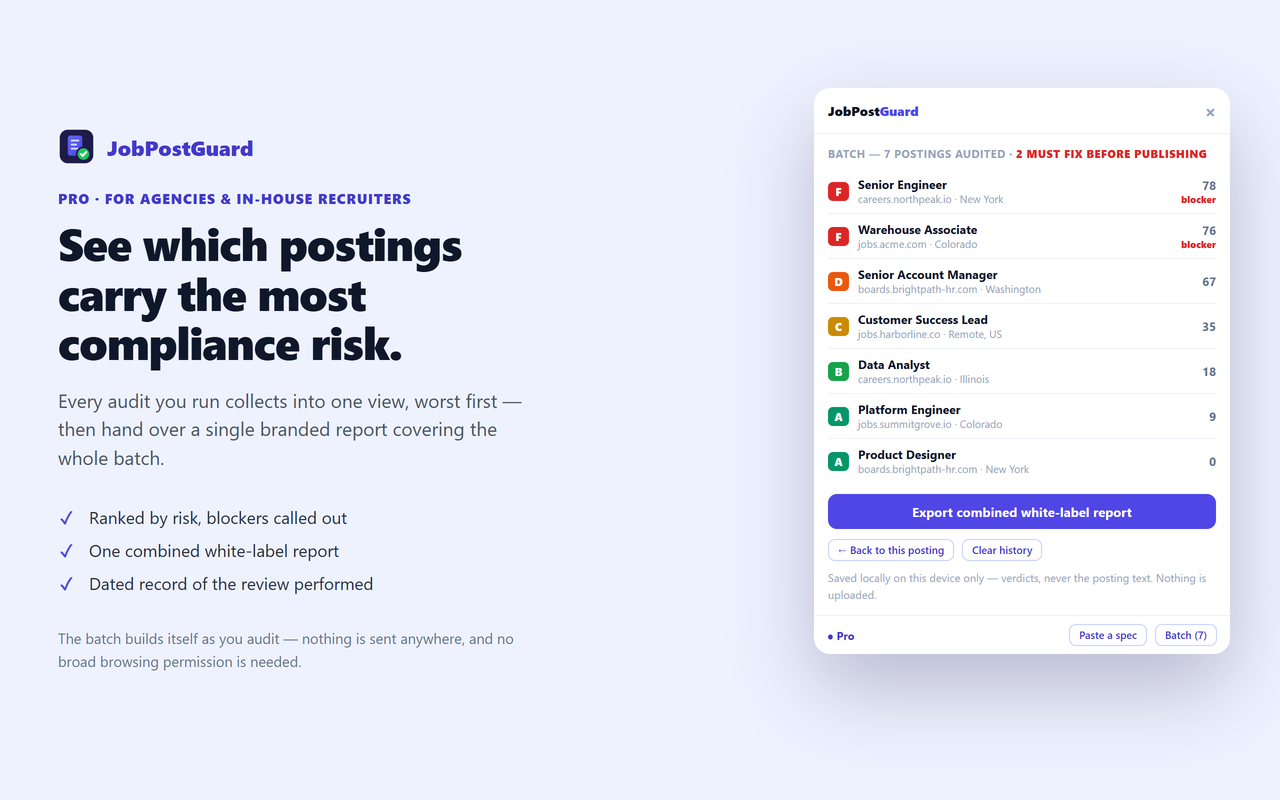
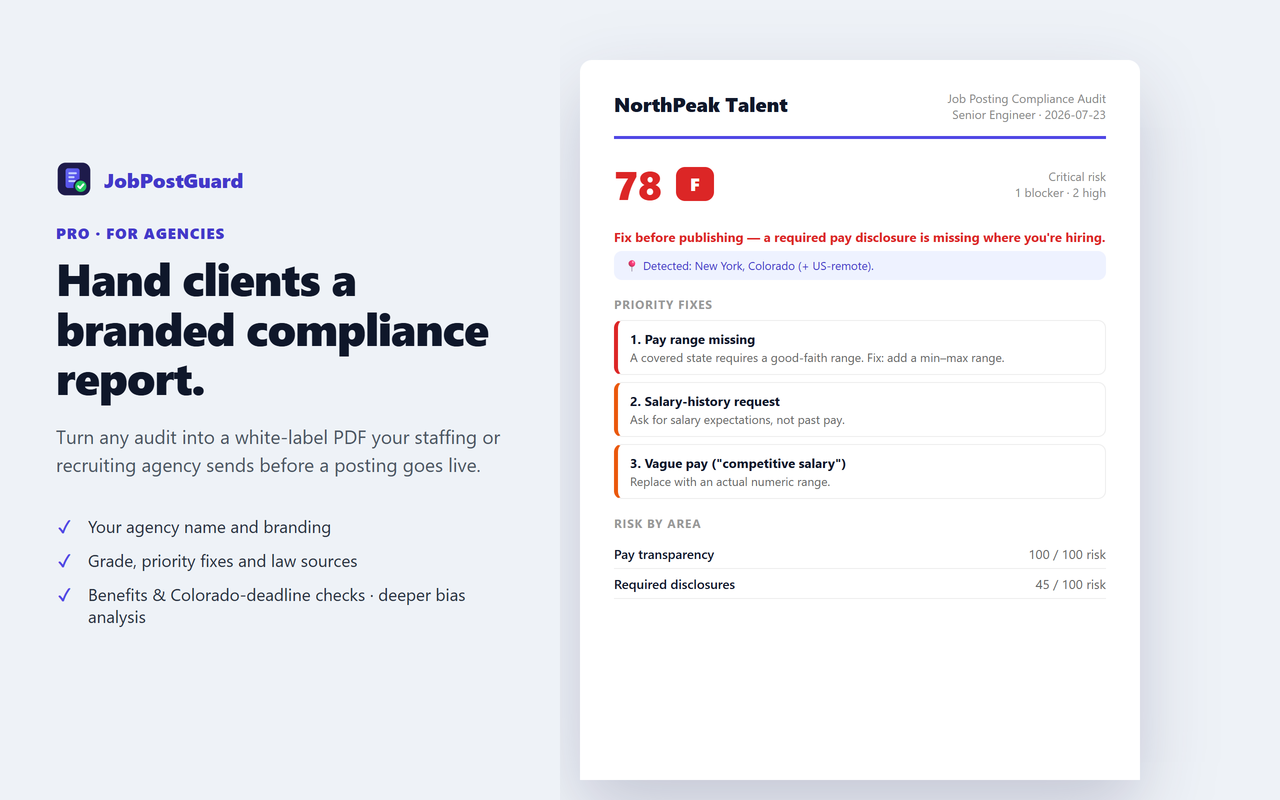
Hand clients a branded compliance report

Turn any audit into a white-label PDF your agency sends before a posting goes live.

JobPostGuard Pro white-label PDF: an agency-branded job-posting compliance report with grade, priority fixes and risk by area

Simple pricing

One-time license, no subscription.

Free
$0
  • Unlimited posting audits
  • Pay-range + vague-pay check
  • Salary-history request check
  • EEO-statement + core age/gender flags
  • Every finding mapped to its rule
Get JobPostGuard
Best value
Pro
$99 one-time
  • Everything in Free
  • White-label branded PDF report
  • Benefits & Colorado-deadline checks
  • Deeper bias analysis (ableist, national-origin, experience caps)
  • Lifetime updates · 3 devices
Get Pro — $99

$99 once · no subscription · secure Paddle checkout

Not sure yet? Start free — unlimited audits, no time limit. Upgrade only when you need the white-label report or the deeper checks.

🛡️ 30-day money-back guarantee — no questions asked. If Pro isn't right for you, email [email protected] with your Paddle receipt within 30 days and we'll refund every cent — no reason needed. Refund policy →

Built to be trusted

An honest, privacy-first tool from an independent developer — every claim here is verifiable.

Made by an indie dev

Built and maintained by Vietcodex, a solo developer shipping privacy-first browser extensions — TailGrab, ScriptDrag, ListingLens and TrustShield. No VC, no ads, no telemetry.

🔑

Minimal permissions

Requests only activeTab, scripting and storage. It runs only when you click the icon — no page is touched before that, and there's no broad site access.

🔒

The posting stays local

Nothing about the posting is uploaded. The only network call is a periodic license check for Pro — no analytics SDK, no remote code.

📋

Honest by design

Every rule cites a public state statute or EEOC/ADA/Title-VII source. It is informational, not legal advice, and bias-language flags are advisories to review — never asserted as violations.

💳

Secure one-time payment

Checkout is handled by Paddle, our Merchant of Record — your card details never touch our servers and sales tax/VAT is handled for you. $99 once, no subscription.

🛡️

30-day money-back

Not right for you? Email [email protected] within 30 days — no questions, no reason needed. Refund policy →

Frequently asked questions

Is JobPostGuard free?

Yes. The Free tier gives unlimited audits with the pay-transparency range check, vague-pay and salary-history detection, EEO-statement check, and the core age/gender bias flags — no login. Pro ($99 one-time) adds a white-label PDF report, benefits & Colorado application-deadline checks, deeper bias analysis (ableist and national-origin language, experience caps), and multi-posting.

Does JobPostGuard guarantee my posting is legal or prevent a lawsuit?

No — it is informational, not legal advice, and does not create an attorney-client relationship. It flags known, documented pay-transparency and bias risks from the posting text; it can't verify employer size or exact work location. Verify against current law and consult a qualified employment attorney for your situation.

Which laws does it check?

US pay-transparency salary-range laws in 15+ states/localities (CA, CO, WA, NY, IL, MD, MN, NJ, VT, MA, HI, DC, VA, ME, DE, plus NYC, Jersey City, Cleveland), benefits-disclosure requirements, salary-history bans (~22 states), the Colorado application-deadline rule, plus EEOC/ADEA/Title-VII/ADA bias language. Every finding cites its source.

How does it handle different states?

It reads the posting's location + remote status and only asserts a hard violation when a covered jurisdiction applies — otherwise the item is advisory ("required if hiring in a pay-transparency state"). A US-remote role is treated as covered because it's performable in those states.

Do I need an account or login?

No sign-up. The audit runs in your browser and nothing is uploaded — the only network request is a Pro license check.

Which job sites does it work on?

Any job posting — LinkedIn, Indeed, Greenhouse, Lever, Workday, Ashby, or a company careers page. It reads the JobPosting structured data when present, and the page text otherwise.

Are the bias-language flags reliable?

Bias flags are wording heuristics shown as advisories to review in context — never scored and never asserted as a violation, because a single word is not proof of discrimination. Only the deterministic checks (range present, EEO statement, salary-history request) are scored.

Which browsers does it support?

Chrome, Edge, and Firefox. JobPostGuard is launching soon — store links appear in the install section as each store approves it.
Get JobPostGuard

Free to start — install, open a job posting, and click the icon.

See plans — Free to start
Coming soonChrome Web Store Coming soonEdge Add-ons Coming soonFirefox Add-ons

JobPostGuard is launching soon — the live install links appear here the moment each store approves it.

More tools from Vietcodex

Privacy-first browser extensions, each a one-time license.