Chrome extension for web developers & performance

See which third-party scripts drag down your page

Open any page and ScriptDrag names every third-party script on it — Google Tag Manager, that chat widget, the ad network — with its weight, an estimated main-thread cost, and a kill-list of what to defer or drop. One click. No DevTools, no Lighthouse run, no setup.

Add to Chrome — Free See pricing Free every day · Pro is a one-time license
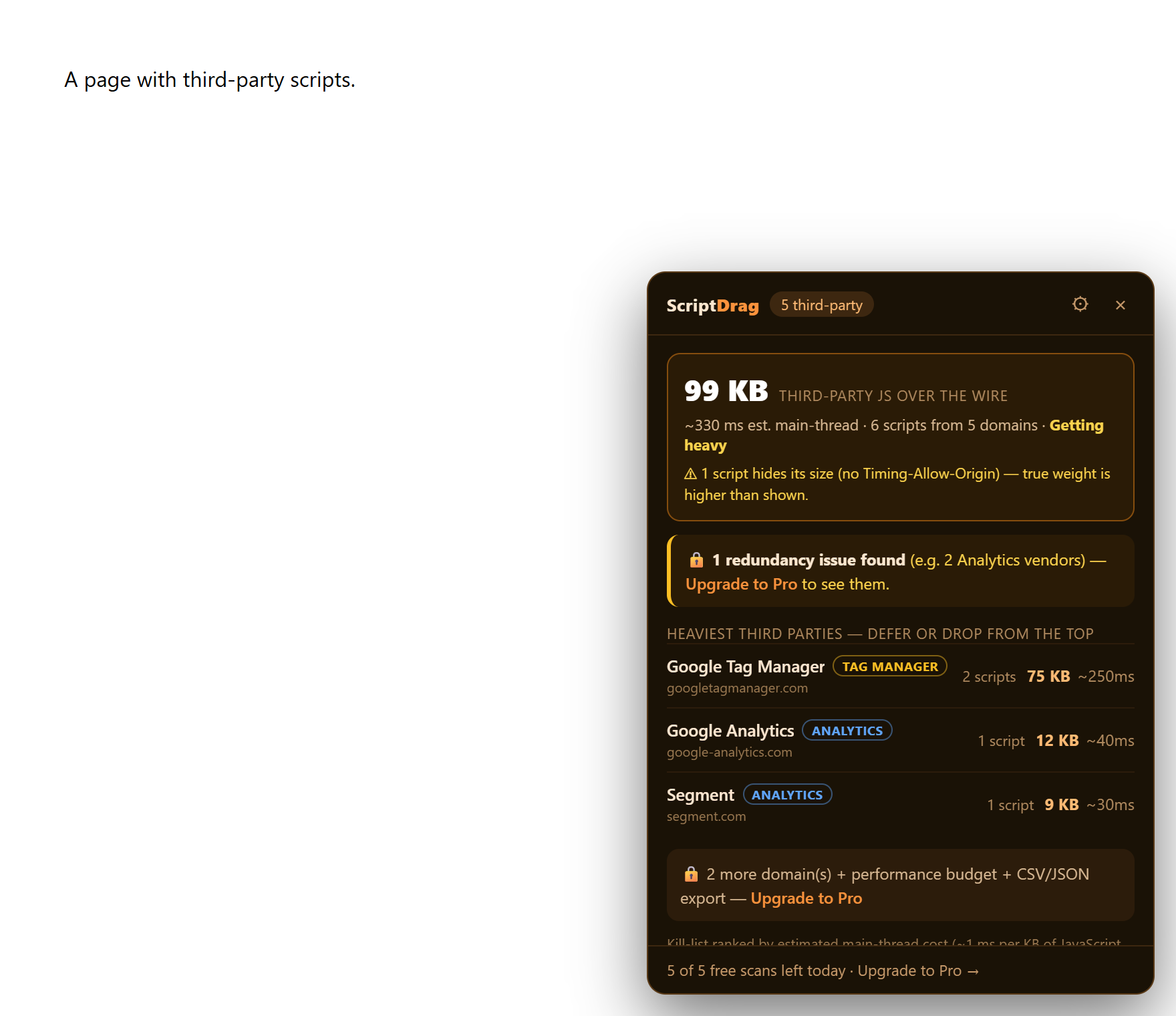
ScriptDrag panel showing named third-party vendors, their size and estimated cost, and a redundancy finding

Third-party JavaScript is where the weight hides

ScriptDrag turns anonymous domains into named vendors and a ranked to-do list.

Who's actually on your page

Names every third-party script — Google Tag Manager, Intercom, Doubleclick — with its category, instead of anonymous domains.

A kill-list ranked by cost

Ranks third parties by estimated main-thread cost so you fix the worst offenders from the top down.

Redundant-vendor detector

Flags when you ship 3 analytics tools or 2 chat widgets — the bloat you can cut today. (Pro)

Honest weight

Real bytes over the wire plus an estimated cost. Scripts that hide their size are labeled “size hidden”, never shown as 0.

One click, no DevTools

Reads the page's own Resource Timing. No profiling trace, no Lighthouse audit, nothing to configure.

📄

Branded report

Export a client-ready Markdown or printable PDF report with your agency's name on it. (Pro)

Three steps

1

Open the page

Load any page you want to audit and let it finish.

2

Click the icon

ScriptDrag reads the current tab's Resource Timing — nowhere else.

3

Work the kill-list

Defer, lazy-load, or drop the heaviest third parties from the top. Press Esc to stop.

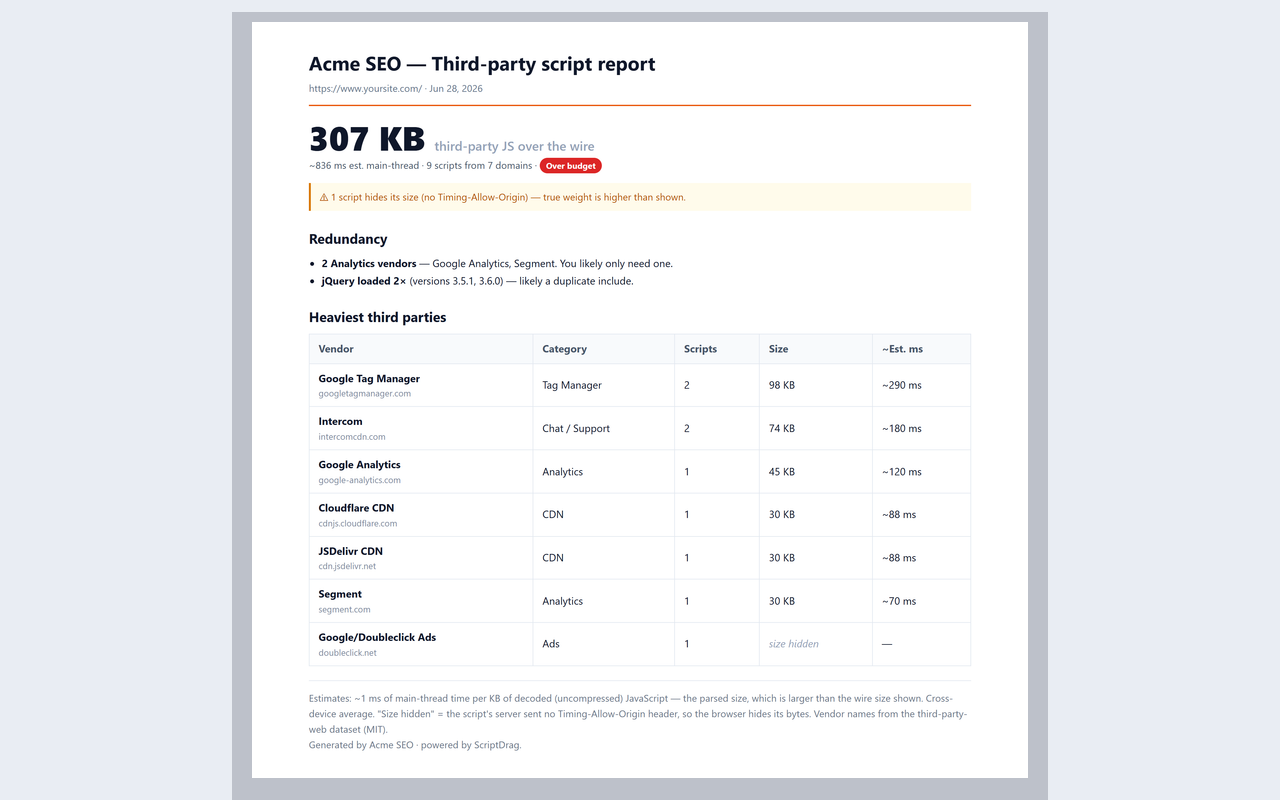
A report you can hand to a client

One click turns a scan into a branded, client-ready deliverable.

ScriptDrag branded third-party script report with summary, redundancy findings and a vendor table

Simple pricing

One-time license, no subscription.

Free
$0
  • 5 scans per day
  • Named third parties + categories
  • Kill-list top offenders
  • Performance budget badge
Add to Chrome
Best value
Pro
$89 one-time
  • Unlimited scans
  • Full kill-list (every domain)
  • Redundant-vendor detector
  • CSV / JSON export
  • Branded shareable report
  • Lifetime updates · 3 devices
Get Pro

$89 once · no subscription · secure Paddle checkout

Not sure yet? Start free — 5 scans a day, no login. Upgrade only when you need unlimited scans, the full kill-list, or a branded report, and even that's covered below.

🛡️ 30-day money-back guarantee — no questions asked. If Pro isn't right for you, email [email protected] with your Paddle receipt within 30 days and we'll refund every cent — no reason needed, no upsell call, a real human replies. Refund policy →

Running an agency? White-label your reports with your own name on the Pro license — talk to us.

Built to be trusted

An honest, privacy-first tool from an independent developer — every claim here is verifiable.

Made by an indie dev

Built and maintained by Vietcodex, a solo developer shipping privacy-first browser extensions — TailGrab, AnswerGap and StepRecorder. No VC, no ads, no telemetry.

🔑

Minimal permissions

Requests only activeTab, scripting and storage. No host permissions — it only reads the current page's own Resource Timing performance data locally. Check it yourself on the store listing.

🔒

Your data stays local

Nothing about the pages you scan ever leaves your browser. The only network call is a periodic license check for Pro — no analytics SDK, no remote code.

🔁

Actively maintained

Kept working against Chrome and browser updates. Pro includes lifetime updates. Last updated July 2026.

💳

Secure one-time payment

Checkout is handled by Paddle, our Merchant of Record — your card details never touch our servers and sales tax/VAT is handled for you. $89 once, no subscription.

🛡️

30-day money-back

Not right for you? Email [email protected] within 30 days — no questions, no reason needed. Refund policy →

Add ScriptDrag to your browser

Free to start — install, open a page, and click the icon.

Add to Chrome — Free
Available onChrome Web Store Coming soonEdge Add-ons Coming soonFirefox Add-ons

Live on the Chrome Web Store — Edge & Firefox coming soon.

Already using ScriptDrag? Be one of the first to rate it on the store — it helps other developers find it, and we read every review.

Frequently asked questions

Is ScriptDrag free?

Yes. The Free tier gives you 5 scans per day — named third parties with categories, a kill-list of the top offenders, and a performance budget badge — with no login. Pro ($89 one-time) adds unlimited scans, the full kill-list for every domain, the redundant-vendor detector, CSV/JSON export, branded shareable reports, lifetime updates and 3 devices.

Do I need an account or login?

No. ScriptDrag is a browser extension with no sign-up. Everything runs on your device.

Does my data leave my machine?

No. ScriptDrag reads the current page's own Resource Timing performance data locally and nothing about the pages you scan is ever uploaded. It requests no host permissions. The only network request it makes is a periodic license check for Pro.

How is it different from Lighthouse or the DevTools performance tab?

Lighthouse and the performance panel give you a trace or an audit you have to interpret. ScriptDrag names every third-party script — Google Tag Manager, the chat widget, the ad network — ranks them by estimated main-thread cost, and hands you a kill-list in one click. No profiling run, no Lighthouse audit, nothing to configure.

How does it estimate cost, and are the numbers exact?

ScriptDrag reads real bytes over the wire from Resource Timing plus an estimated main-thread cost. It's an estimate to help you rank offenders, not a substitute for a full profiler trace. Scripts that hide their size are labeled “size hidden” rather than shown as 0.

What is the redundant-vendor detector?

It flags when a page ships overlapping tools — 3 analytics scripts or 2 chat widgets — so you can cut the bloat you don't need. The redundant-vendor detector is a Pro feature.

Can I export a report for a client?

Yes, on Pro. Export a client-ready Markdown or printable PDF report, plus CSV/JSON, with your agency's name on it. The Free tier is for on-the-spot scanning.

Which browsers does it support?

ScriptDrag is live now on the Chrome Web Store. Edge and Firefox support is coming soon — see the install section above for live store links.

Can I move my Pro license to a new device?

Yes. Your Pro license activates on up to 3 devices. To move it to a new machine, email [email protected] with your Paddle receipt and we'll free up a seat.
More developer tools from Vietcodex

Privacy-first browser extensions, each a one-time license.

New script signatures, as they land

ScriptDrag names the vendor behind each script. We add new ones as trackers and widgets appear — that, and the occasional new Vietcodex tool.

About one email a month. No spam, no sharing — unsubscribe any time by replying. See our privacy policy.